
AI Catalog · optional
Photos in.
Finished lots out.
Shoot each lot on your phone. The AI writes the title, description, condition, category and starting bid from the photos, in your house style. You read, fix anything, and approve.
AI Catalog · optional
Let the AI write the lots. (29 seconds)
No sound. Real screens from BBZ Catalog and one of our own sales.
Step 1 · Shoot
Shoot lot after lot on your phone.
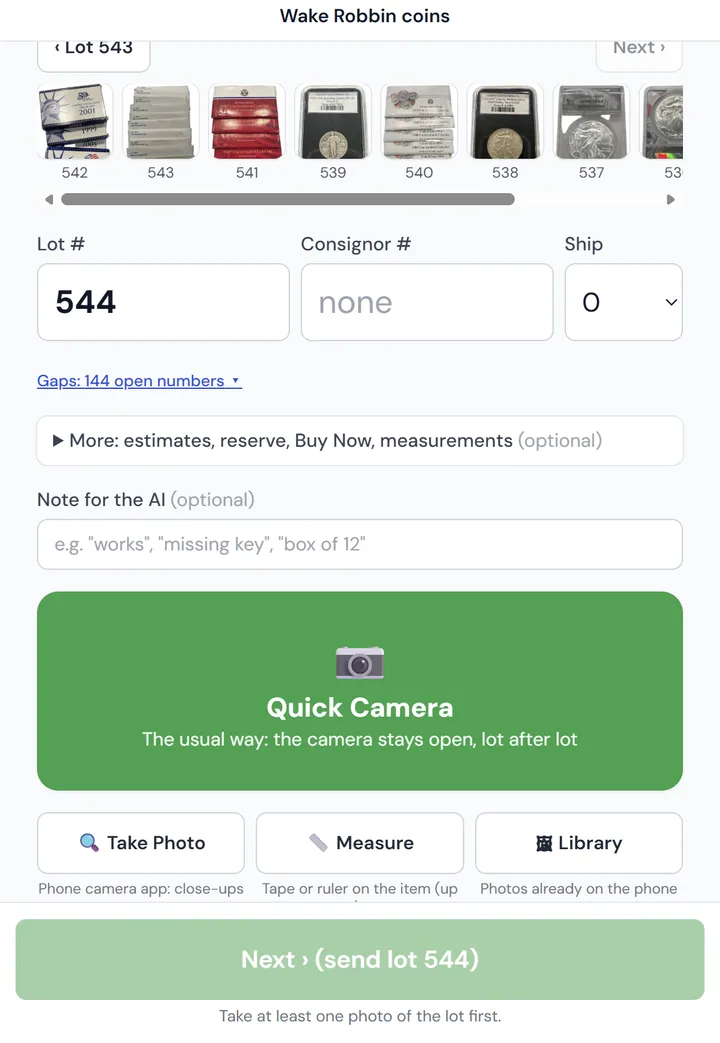
Open the catalog on your phone, enter the lot number and take the photos. Quick Camera stays open, and the next lot number is filled in for you, so you can walk the tables and keep going.
- ✓Or upload a folder of photos from a camera - named by lot number, or one lot after another.
- ✓Add a short note for the AI (for example "signed by the artist") when it helps.
- ✓Take a measurement photo with a tape measure on the item - the AI reads the size from it.
- ✓Each lot goes to the AI as soon as you press Next, so lots are being written while you shoot.
Step 2 · The AI writes
Every field filled in from the photos.
The AI looks at the photos and writes the lot the way your catalog needs it.
- ✓Title and full description, following your house writing rules and lengths.
- ✓Condition, category and subcategory - from BBZ, HiBid or your own category list.
- ✓A retail estimate, and a starting bid worked out the way you set it.
- ✓Gold and silver: the melt value from your metal prices, and the estimate is never set below melt.
- ✓Google Lens and eBay sold links on every lot to check the AI in one click.
Step 3 · Review
You read it. You approve it.
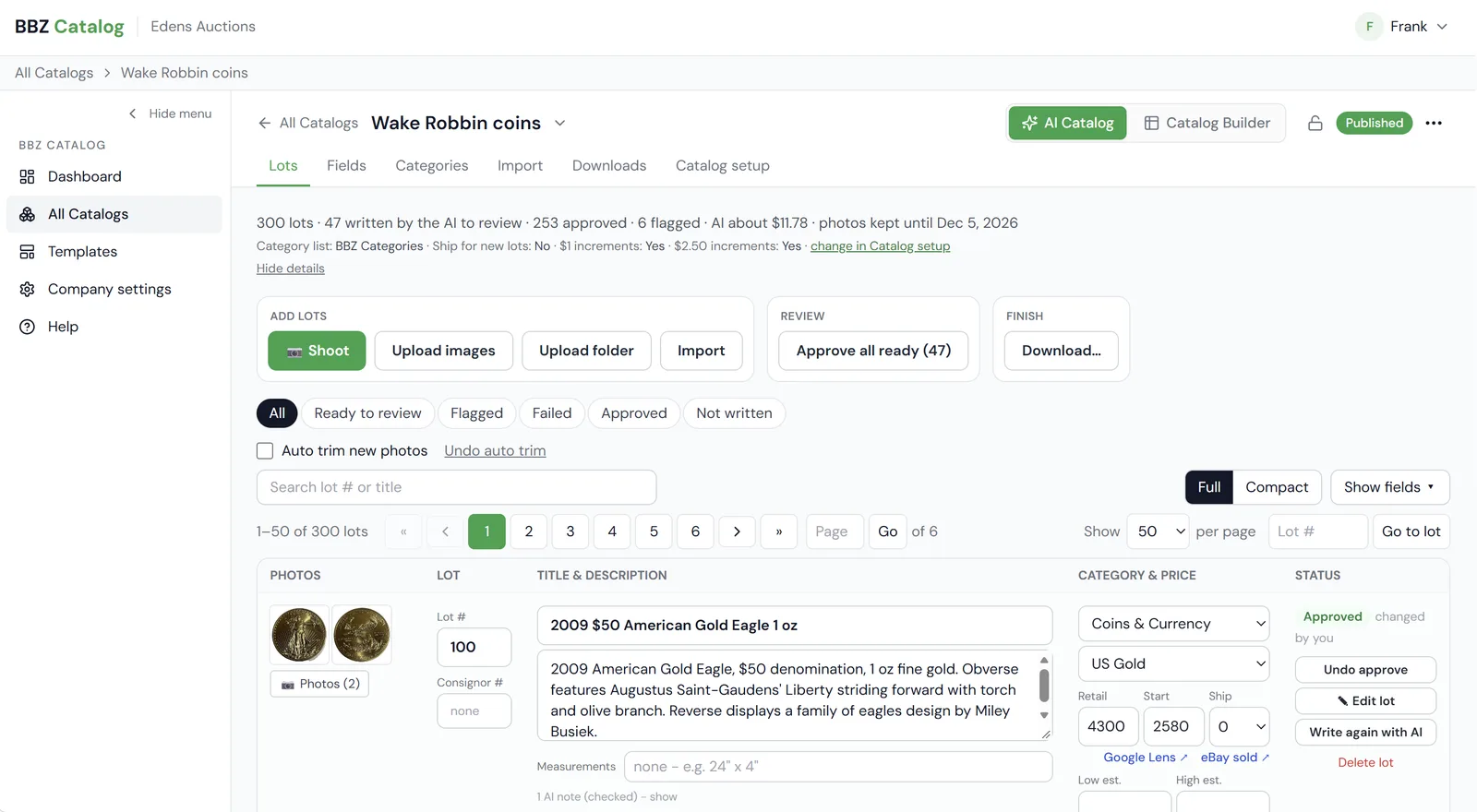
Lots the AI finished show as Ready to review. Flags point out what to look at - a category not on your list, or a possible high-value item - so you see at a glance what still needs you.
- ✓Fix any field right in the list, or open the lot.
- ✓Not happy with a lot? Have the AI write it again - free.
- ✓Approve one at a time, or approve all ready lots at once.
A real lot
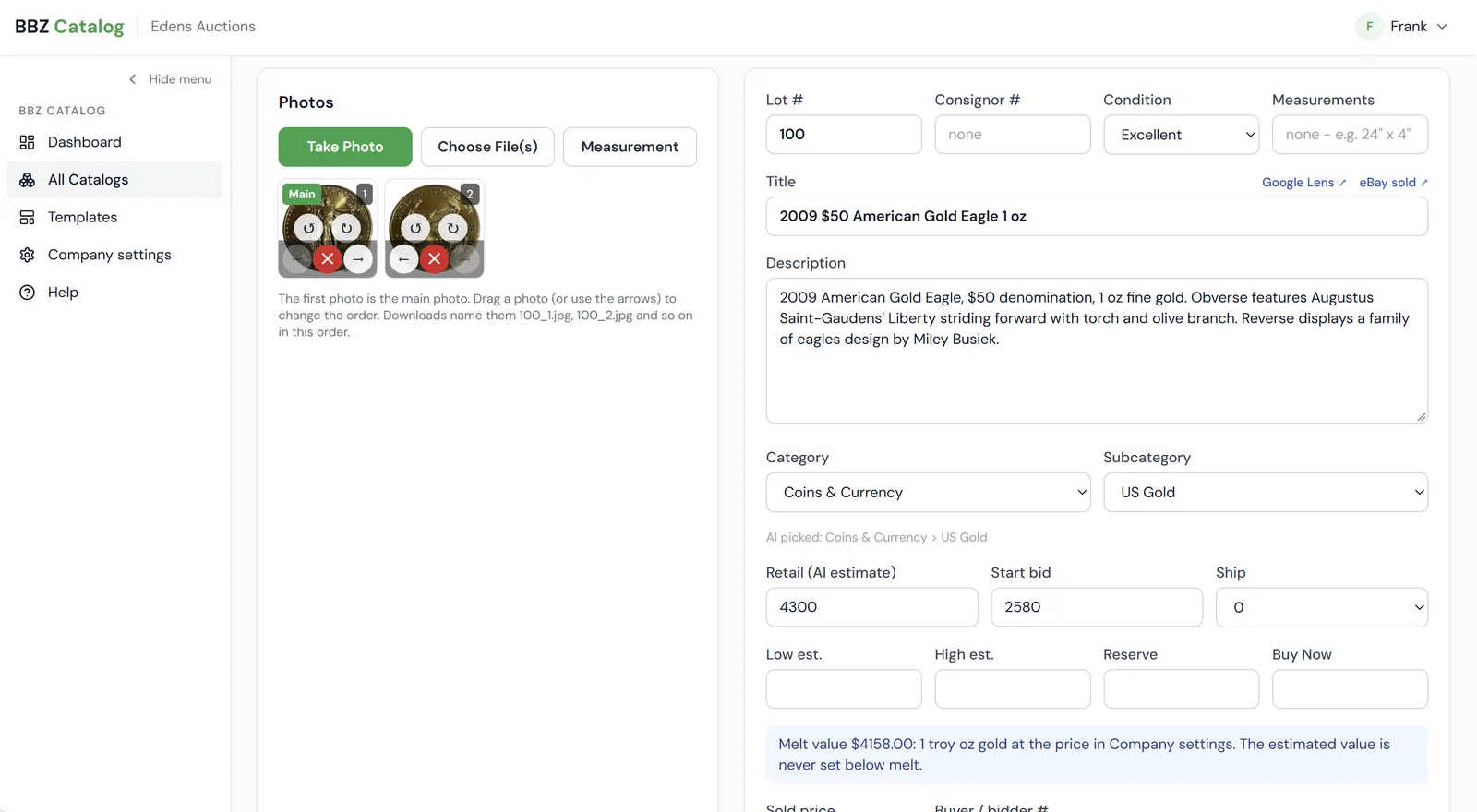
Two photos. One finished lot.
Lot 100 from one of our own sales, as the AI wrote it.
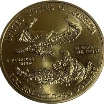
2009 $50 American Gold Eagle 1 oz
2009 American Gold Eagle, $50 denomination, 1 oz fine gold. Obverse features Augustus Saint-Gaudens' Liberty striding forward with torch and olive branch. Reverse displays a family of eagles design by Miley Busiek.
- Condition
- Excellent
- Category
- Coins & Currency › US Gold
- Retail estimate
- $4,300
- Start bid
- $2,580
A real sale
See one of our own sales, start to finish.
Step 1 · Public catalog page
Built and published in BBZ Catalog
Edens Auctions shot 300 gold and silver coin lots, let the AI write them, and published the catalog as its own public page.
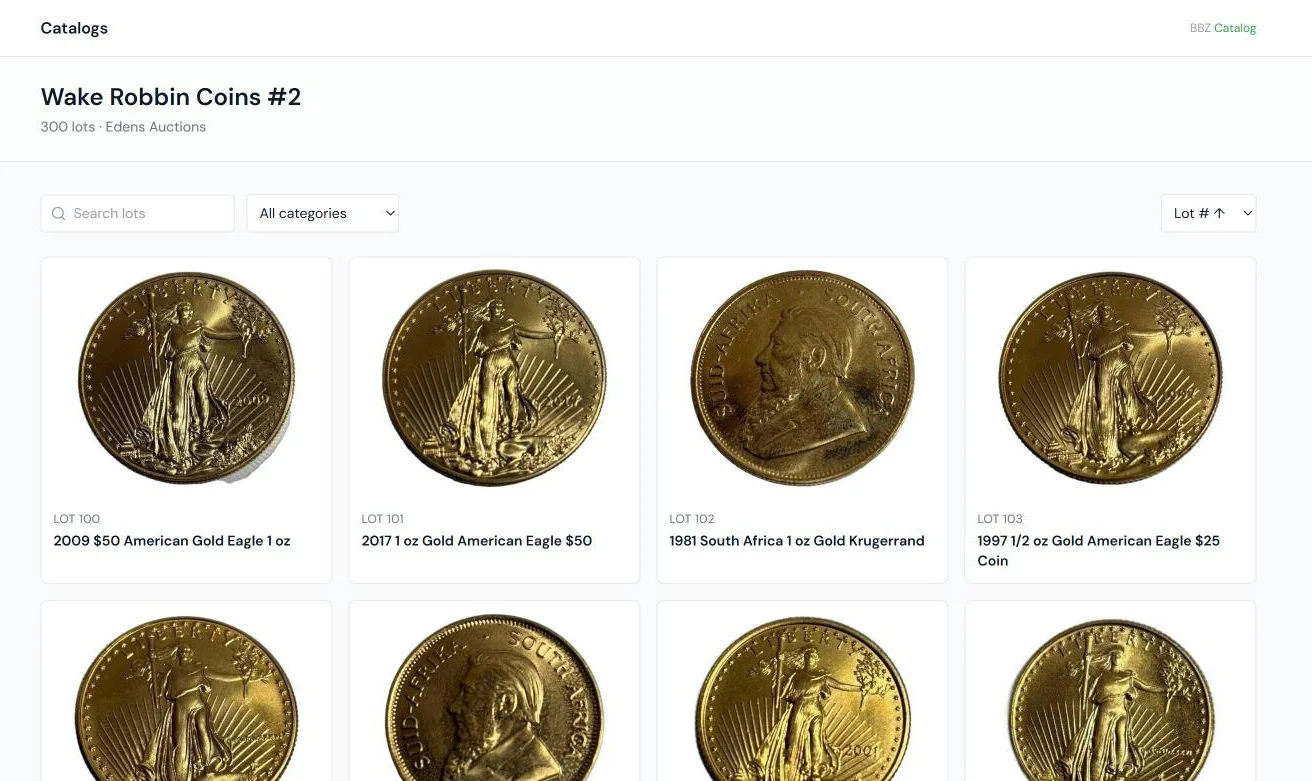 Browse the public catalog →
Step 2 · Live for bidding
The same lots, up for bid on BidBuyZoom
The catalog was downloaded and uploaded to BidBuyZoom, where bidders register, watch lots and bid.
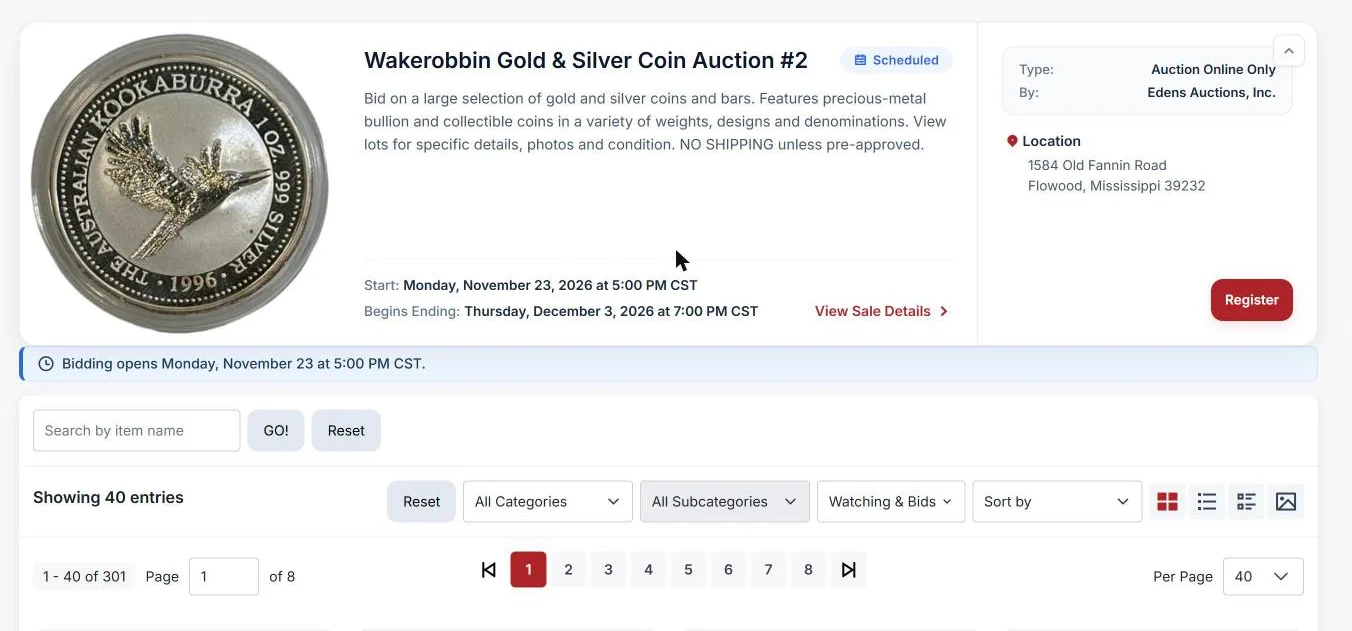 See the sale on BidBuyZoom ↗
What public catalog pages are for
Publish any catalog and it gets its own page, with your company name and a link to your website. Use it to:
- ✓Share one link with bidders and consignors, by email or on social media, before bidding opens.
- ✓Let Google find your lots, so people searching for an item can find your sale.
- ✓Keep the catalog online while you sell the same lots on BidBuyZoom, HiBid or any other site.
- ✓Show it safely: consignor, reserve, buy-now and your private fields never show on the public page.
Made for auctioneers
Built by an auctioneer, for real sales.
Gold and silver melt value
Melt value on every gold and silver lot from your metal prices, and the estimate is never set below melt.
Check the AI in one click
Google Lens and eBay sold links on every lot, so you can check an item and its price before you approve it.
Flags on lots to look at
A possible high-value item, or a category not on your list, is flagged so it gets a second look.
The catalog stays free
Unlimited catalogs and lots, free. Use the AI on a whole sale, some lots, or none.
Built by a third-generation auctioneer, and used on our own sales.
AI prices
You pay only for lots the AI writes. The catalog program - shooting, importing, editing, downloading and printing - is free.
What a sale costs
A 300-lot sale
$0
for the catalog: shoot, edit, download, print
$15–$30
if the AI writes all 300 lots (5¢–10¢ a lot)
No monthly fee. No per-user fee. First 200 AI lots free.
To start
Free
First 200 AI lots
One time, for each new company. No card needed.
Pay as you go
$10
100 lots · 10¢ each
Save a card once; more are bought when yours run out.
500-lot pack
$30
6¢ a lot
Buy any time. Packs never run out.
1,000-lot pack
$50
5¢ a lot
Buy any time. Packs never run out.
Don't need the AI? The Catalog Builder is free.
Questions
Do I have to use the AI?
No. The catalog program is free and works without it - you can shoot, type or import every lot yourself. Use the AI on a whole sale, on some lots, or not at all.
What counts as an AI lot?
A lot is counted the first time the AI writes it. Asking the AI to write it again is free, and lots you write, import or edit yourself are never counted.
Can I change what the AI wrote?
Yes - every field, in the list or on the lot. You approve each lot (or all ready lots at once).
Will it write the way we write?
In Company settings you set how the AI writes: your house writing rules, title and description length, and how the starting bid is worked out. Each catalog can add a note about that sale.
What happens when my lots run out?
Buy a pack, or save a card for pay as you go: 100 more lots are bought when yours run out, so the AI never stops in the middle of a sale.
Let the AI write your next sale.
The first 200 AI lots are free. The catalog program is always free. No card needed.